
What Is a Rent Ledger for Landlords and Property Managers


A rent ledger is a tenant-level payment history that records every charge, payment, late fee, and running balance for a single tenancy. Three things make it indispensable: it feeds your tax preparation and rental income reporting, it serves as documentary evidence in eviction filings and payment disputes, and it gives lenders or future landlords a verified payment history for tenant screening. You can create one on paper, build it in a spreadsheet using a free template, or let property-management software post entries automatically. The IRS expects landlords to keep records supporting all rental income reported, and a well-maintained ledger is the cleanest way to do that.
Accounting and tax prep: matches deposits to income reported on Schedule E
Legal evidence: documents cleared payment dates and references for court filings
Tenant history: demonstrates on-time payment for screening or loan qualification
Table of Contents
What does a rent ledger actually look like?
The clearest way to understand a rent ledger is to see one. Every entry follows a transactional-row format: one row per charge or payment, with a formula computing the running balance after each row. Below is a sample layout with three common scenarios.
Date Due | Date Paid | Description | Charge | Payment | Method | Reference | Balance | Notes |
— | — | April rent | — | — | ACH | — | — | On time |
— | — | May rent | — | $900 | Check | — | — | Partial payment |
— | — | Late fee | — | — | — | — | — | Per lease §6 |
Notice how the running balance climbs after the partial payment and again after the late fee. That column is the ledger’s most important feature. It tells you, at a glance, exactly what a tenant owes at any point in time, and it tells a judge the same thing.
The balance column must update after every cleared transaction, not after every due date.
A zero balance confirms full payment; a positive balance signals an open amount owed.
Negative balances indicate overpayment or a prepaid credit.
Pro Tip: Never adjust the balance manually. Use a formula (e.g., =previous balance + charge – payment) so the math is auditable and consistent across every row.
Which fields belong on every rent ledger?
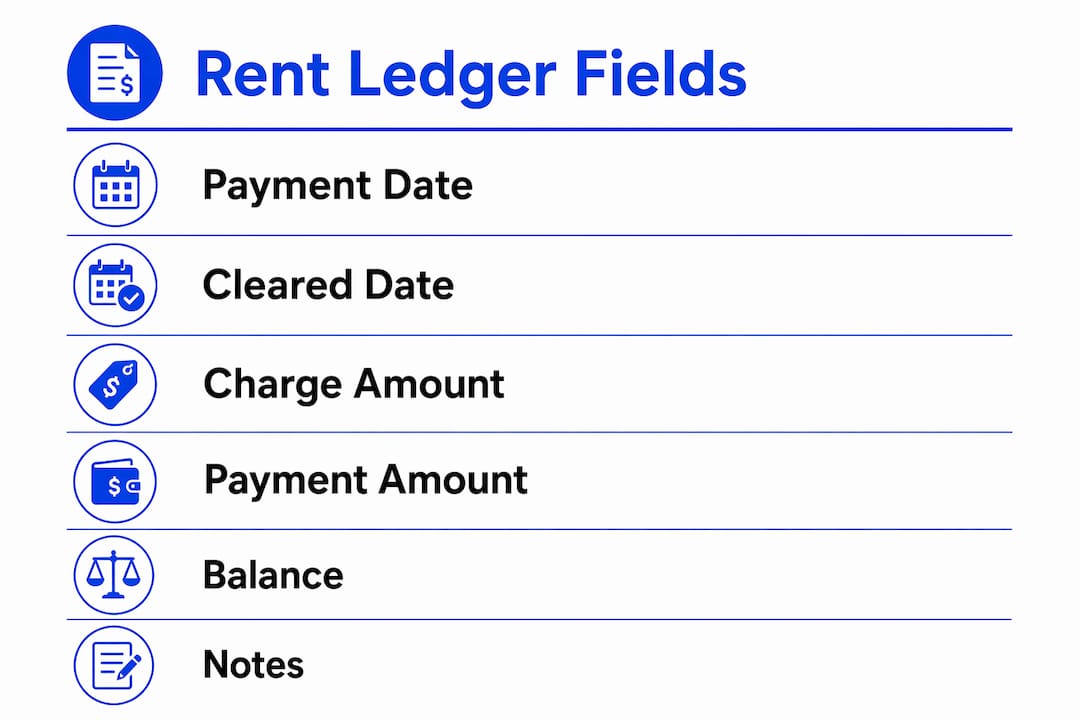
A ledger that holds up in court or survives an IRS audit needs more than just dates and dollar amounts. Stessa’s guidance on reading a rent ledger identifies payment method and payment reference numbers as the two fields most often missing from landlord-built ledgers, yet they are the ones that tie each row to a real bank deposit.
Must-have fields:
Tenant name and unit address
Lease start and end dates (in the header)
Date the charge was due
Date the payment cleared the bank
Charge amount (rent, fees, other)
Payment amount received
Running balance after each transaction
Payment reference (check number, ACH transaction ID, money order number)
Optional but strongly recommended:
Payment method (ACH, check, cash, debit/credit card)
Bank-cleared date (separate from the date the tenant submitted payment)
Late-fee policy reference (e.g., “per lease §6”)
Notes for concessions, repair credits, or disputed amounts
Pro Tip: Record the bank-cleared date as a separate column from the tenant’s payment date. A tenant who mails a check on the 1st but whose funds clear on the 5th has a different legal standing than one whose ACH posts on the 1st. That distinction matters in court.
How do you create a rent ledger from scratch?

Your method depends on how many units you manage and how comfortable you are with spreadsheets. Here are three practical workflows.
Paper ledger
Create a header block: tenant name, unit, lease term, monthly rent amount, and late-fee policy.
Draw columns for date due, date paid, description, charge, payment, reference, and balance.
Enter one row per transaction as it occurs; calculate the balance by hand.
Sign and date each page at month-end.
Scan every completed page and store the PDF offsite (cloud storage or email to yourself).
Spreadsheet template
Open a blank spreadsheet in Google Sheets or Excel and label columns per the must-have fields above.
Use transactional rows rather than months as columns; this mirrors standard accounting workflows and makes running-balance formulas reliable.
In the balance column, enter: =IF(ROW()=2, D2-E2, G1+D2-E2) (adjust column letters to match your layout).
Lock the header row and protect formula cells to prevent accidental overwrites.
Save a new version at the end of each month labeled by property and period (e.g., Unit4B_May2026.xlsx).
Property-management software (Landlord Studio, Stessa)
Create a property and unit profile; enter the tenant’s lease terms and monthly charge schedule.
Enable bank sync or set up manual posting rules so charges post on the due date automatically.
Post payments only when funds clear the bank, not when the tenant reports sending them.
Run a monthly ledger export (PDF or CSV) and archive it alongside your owner statement.
Syncing with bank deposits is the critical step regardless of method. Only mark a payment when funds clear — posting on a tenant’s promise-to-pay date creates reconciliation mismatches and weakens your legal position if a dispute arises.
Manual vs. spreadsheet vs. software: which one fits your portfolio?

Method | Setup effort | Accuracy & audit trail | Scale & integrations | Ongoing cost | Templates / export |
Paper / manual | Low | Weak (no formula checks) | 1–3 units only | Free | None; must scan |
Spreadsheet | Medium | Good if formulas are protected | Up to ~10–12 units | Free | Download/modify templates |
Property-management software | Higher upfront | Strong (bank sync, timestamps) | Unlimited; accounting integrations | Monthly fee | Exportable PDF/CSV |
Spreadsheets work well for small portfolios, but once you cross roughly 10–12 doors, manual entry errors and reconciliation time compound quickly. At that point, tools like Landlord Studio or Stessa pay for themselves in hours saved and mistakes avoided.
Small portfolios with a few units can use protected spreadsheet templates.
Medium portfolios benefit from spreadsheets with strict version control and backups.
Larger portfolios should consider automated software with bank sync and exportable ledgers.
The real cost of staying on paper too long is not the subscription fee you avoided. It is the hours spent reconstructing records when a tenant disputes a balance or a court asks for documentation.
Why a rent ledger matters for accounting, taxes, and legal protection
A rent ledger is not just bookkeeping. The IRS requires landlords to keep records supporting rental income reported on their returns, and a ledger is the most direct way to satisfy that requirement. Each row maps to a deposit in your bank account, making Schedule E reconciliation straightforward.
Beyond taxes, the legal and evidentiary value of a detailed ledger is significant. When you file for eviction based on nonpayment, courts want to see a clear payment history with cleared dates and references, not a verbal account of what happened. A ledger that documents every transaction, including partial payments and late fees, gives you a paper trail that is hard to dispute.
Cash-flow monitoring: spot payment patterns early (chronic late payers, declining balances).
Owner statements: feed accurate data to monthly reports for your investors or partners.
Tenant screening and references: a clean ledger proves on-time payment history to future landlords or lenders.
Tax preparation: matches deposits to rental property expense tracking and income reporting.
Pro Tip: A ledger that shows cleared-date posting and consistent late-fee application is far stronger evidence than one that shows only due dates. Judges and attorneys look for that consistency.
How to keep your ledger accurate every month
Consistency is what separates a useful ledger from a liability. Here is a practical monthly routine.
Post cleared payments. As each payment clears your bank, enter the cleared date, amount, method, and reference number immediately.
Apply charges on the due date. Enter rent charges and any recurring fees (pet rent, parking) on the first of the month, before payments post.
Reconcile to bank deposits. Match every ledger payment row to a corresponding deposit in your bank statement. Flag any row without a matching deposit.
Resolve mismatches before issuing owner statements. A ledger that does not match your bank is not ready for reporting.
Archive a monthly snapshot. Save a read-only copy of the ledger labeled by unit and month before making any new entries.
Back up offsite. Store copies in cloud storage and a local drive. Label files consistently (e.g., Unit4B_May2026_FINAL.pdf).
Pro Tip: Keep version history turned on in Google Sheets or use Excel’s AutoSave with OneDrive. If a formula is accidentally overwritten, you can restore the prior version without reconstructing the data.
Failing to reconcile monthly is one of the most common and costly mistakes multi-unit managers make. A mismatch discovered six months later is far harder to explain than one caught the same week.
Rent ledger vs. rent roll: understanding the difference
These two documents serve different audiences and answer different questions.
A rent ledger is a single-tenant transactional record. It answers: “What did this tenant owe, what did they pay, and when?” A rent roll is a portfolio-level snapshot. It answers: “How many units do I have, what is each leased for, and what is my total expected monthly income?”
Rent ledger:
One document per tenancy
Updated after every transaction
Used by landlords and managers for reconciliation, disputes, and tax prep
Primary audience: you, your accountant, and the court
Rent roll:
One document covering all units
Updated monthly or at lease changes
Used by investors, lenders, and buyers to assess portfolio income and occupancy
Primary audience: lenders underwriting a loan, investors reviewing a deal
Use the ledger when a tenant disputes a charge or you are preparing for an eviction filing. Use the rent roll when a lender asks for proof of income or an investor wants to evaluate your portfolio.
How to find or reconstruct a ledger you don’t have
If you inherited a property, switched management software, or simply never kept a ledger, you can rebuild one. It takes time, but a reconstructed ledger with documented sources is far better than none.
Where to look first:
Prior property-management software exports or owner statements
Bookkeeper files or accounting software (QuickBooks, Wave)
Scanned PDFs from previous managers
Tenant payment receipts or confirmation emails
Reconstruction steps:
Pull bank statements for the full tenancy period.
Identify every deposit that matches the tenant’s rent amount or a known partial payment.
Create one transactional row per deposit, using the bank-cleared date as the payment date.
Cross-reference tenant communications (texts, emails) to confirm payment intent for ambiguous deposits.
Annotate any uncertain entries clearly (e.g., “amount matches rent; source unconfirmed”).
Note gaps where no deposit appears and the rent was due.
Evidence checklist for disputes or court:
Bank statements showing cleared deposits with dates and amounts
Payment references (check images, ACH confirmations)
Lease agreement showing rent amount and due date
Tenant communications referencing payments
Any receipts issued to the tenant
Stessa’s guidance recommends documenting uncertainties rather than leaving gaps, because an annotated reconstruction is more credible than one that appears artificially complete.
How professional property managers use rent ledgers: a 10-step system
Professional managers treat the ledger as the single source of truth for a tenancy. Here is the workflow that experienced managers follow, along with a brief example of how it plays out in practice.
The 10-step system:
Tenant setup: create a unit and tenant profile with lease start date, monthly charge, and late-fee schedule.
Lease entry: record lease term, rent amount, security deposit, and any concessions in the ledger header.
Recurring charge automation: schedule monthly rent charges to post automatically on the due date.
Post cleared payments only: enter payments when funds clear the bank, never on the date the tenant reports sending them.
Monthly reconciliation: match every ledger row to a bank deposit before closing the month.
Owner reporting: generate a monthly statement from the reconciled ledger.
Archive snapshots: save a read-only monthly copy labeled by unit and period.
Dispute logging: add a notes column entry for any disputed charge, including the date of the dispute and resolution.
Export for legal: when an eviction or dispute escalates, export a PDF ledger with all cleared dates and references visible.
Retention policy: retain ledgers for at least three years after a tenancy ends, consistent with IRS recordkeeping guidance.
A brief example: A tenant in a two-bedroom unit claimed they had paid May rent in full. The manager’s ledger showed a $900 partial payment cleared on May 8 and a $600 balance remaining, with a late fee applied per the lease. The bank statement confirmed the $900 deposit. When the eviction filing was submitted, the judge reviewed the ledger export alongside the bank statement. The running balance, cleared dates, and payment references aligned exactly. The filing proceeded without dispute.
2ndstreetpropertymanagement follows a structured version of this workflow for every managed property, including bank-cleared posting, monthly archiving, and owner statement generation tied directly to the reconciled ledger.
Pro Tip: Export and archive a PDF ledger at the end of every tenancy, not just at year-end. If a dispute surfaces 18 months after move-out, you want a timestamped, read-only record that cannot be edited.
Key Takeaways
A rent ledger is the most defensible record a landlord can maintain: accurate cleared-date posting, monthly reconciliation, and consistent field entries protect you in court, at tax time, and during every owner reporting cycle.
Point | Details |
Post on cleared date only | Record payments when funds clear the bank, not when the tenant reports sending them. |
Reconcile every month | Match each ledger row to a bank deposit before issuing owner statements or closing the period. |
Scale your method | Spreadsheets work well for small portfolios; software with bank sync is the better choice for larger portfolios. |
Retain records for 3+ years | IRS recordkeeping guidance supports keeping rental records for at least three years after filing. |
2ndstreetpropertymanagement | Follows a 10-step ledger workflow covering tenant setup, cleared-date posting, monthly reconciliation, and owner reporting. |
Why the cleared date is the detail most landlords get wrong
Most landlords understand that a rent ledger matters. Fewer understand which single field determines whether that ledger actually holds up when it counts.
The cleared date is not the date the tenant says they paid. It is not the date the check was mailed, the Venmo was sent, or the Zelle transfer was initiated. It is the date the funds appeared in your bank account as a confirmed deposit. That distinction sounds minor until you are standing in front of a judge explaining why your ledger shows “paid April 1” but your bank statement shows a deposit on April 6.
Courts and attorneys look for consistency between the ledger and the bank record. When those two documents align perfectly, your position is nearly unassailable. When they diverge, even by a few days, the tenant’s attorney has an opening. The fix is simple: never post a payment until you have confirmed the deposit in your bank account. Build that habit before you need it.
The other mistake worth naming is treating the ledger as a year-end tax document rather than a live record. Landlords who update their ledger quarterly or at tax time are not keeping a ledger. They are reconstructing one, and reconstructed records carry less weight than contemporaneous ones. The discipline of posting within 24–48 hours of each cleared deposit is what separates a ledger that protects you from one that merely looks like it should.
Let 2ndstreetpropertymanagement handle your ledger and rent collection
Keeping a clean, court-ready rent ledger takes discipline, the right tools, and a consistent monthly routine. For landlords managing multiple doors in Southern New Jersey, that workload adds up fast.
2ndstreetpropertymanagement handles the full cycle: tenant setup, rent collection, ledger maintenance, monthly bank reconciliation, and owner statement generation. Every payment is posted on the cleared date, every month closes with a reconciled ledger, and every owner gets a clean statement they can hand directly to their accountant. Custom add-ons include eviction support documentation and bank reconciliation reports for portfolios with complex payment histories. Built for investors by investors, the firm’s processes are designed around the records that actually matter when disputes arise.
Ready to stop managing spreadsheets and start managing returns? Contact 2ndstreetpropertymanagement to discuss a management agreement for your Southern New Jersey rental portfolio.
Sources, templates, and further reading
The resources below support the guidance in this article and give you direct access to templates, IRS requirements, and additional reading on ledger workflows.
Resource | What it covers |
IRS: Tips on Rental Real Estate Income and Recordkeeping | Official IRS guidance on what rental income records to keep and for how long |
IRS: How Long Should I Keep Records? | IRS retention schedule; supports the 3-year minimum for rental records |
Stessa: How to Read a Rent Ledger | Practical field-by-field breakdown; includes free ledger export from the Stessa platform |
Honeycomb Insurance: Rent Ledger Guide and Free Template | Downloadable template and scale guidance for when to move from spreadsheet to software |
The Bricks: How to Create a Rent Ledger in Excel | Step-by-step Excel setup with transactional-row format and running-balance formulas |
Internal guide covering bookkeeping workflows, reconciliation, and owner statements | |
2ndstreetpropertymanagement: Rental Income Reporting for Landlords | Covers how ledger data feeds into income reporting and Schedule E preparation |
Recommended
Comments